|
|
Hi Jason, It will be applied in UI version 5.23 and 5.24. Thanks. |
|
|
Hi Wooshin, YK, Our QA has verified it on 15.523.6 (Smart3) The game controller works on SKB launcher, but our QA said it's not smooth (compare with RCU BT/IR) And Game controller works smoothly in TVSettings, but not smooth in SKB laucher. |
|
|
Hi Wooshin, YK, I adjust this ticket's Priority/Severity. Because Google TAM will not waive this issue in the future. Please check my notes as belows, ==================================================================================== Our QA has verified it on 15.523.6 (Smart3) The game controller works on SKB launcher, but our QA said it's not smooth (compare with RCU BT/IR) And Game controller works smoothly in TVSettings, but not smooth in SKB laucher. |
|
|
Hi YK, I have verified the game pad on Smart3 with yesterday code (20210409). The arrow key (left side) is working on launcher, but joystick (left side) is not working. The joystick (left side) is working on Google TvSettings, Please forward this information to UI vendor. |
|
|
Hi Jason The UI vendor is working on it, but he don't know how far to implement the game pad. It was the left joystick part in the video. Please provide guidelines for the scope of implementation. Or do UI vendor just need to implement the left joystick? Thanks YK.Jung |
|
|
Hi Mr. Jung, I don't have any guideline. The joystick key event has been reported to Android framework, because it can work in Google TV Settings. I have asked your question to our application engineer, he is in charge of customer launcher implementation in our other project. In our other project, He said he did not make any additional implementations for the gamepad, and gamepad is working on the customer launcher. |
|
|
Hi Jason If that part is not clear, it is difficult to implement in UI vendor. Then, does UI vendor only need to implement left joystick? or does the scope of implementation of UI vender only need to be handled as much as the operation in Google TV setting? Could you ask 3PL about this to make sure ? Thanks YK.Jung |
|
|
Hi Mr. Jung, My question is why the SKB customer launcher can not support joystick. The TVSettings can be controlled by joystick -> This proof that keyevent of Game Controller has already reported key code to Android framework. Does customer launcher block keyevent of joystick? if UI vendor did not block joystick, I think that they may use some components or some library that can not support joystick. UI vendor should address it. We have at least 2 projects that use customer launcher and their customer launcher can be controlled by joystick, our other customers haven't asked any question about game controller to us. |
|
|
Hi Wooshin, YK, I have verified the joystick on SWAN (UI524), I found that the joystick (left side) is working in App page (offline mode), but not working in App page (online mode). I think this is a clue. You can forward this information to the UI vendor. It seems that WebUI does not support joysticks, but native UI can. |
|
|
Hi Wooshin, YK, Any update ? |
|
|
Hi YK, I have verified the gamepad issue with 5.524.4b The following issues are still unresolved. 1. Left joystick is not working (can not move focus) 2. Press Right joystick can not select item 3. Home button on game pad is not working All the above items can work on the native UI (when Ethernet plug out) |
|
|
Reminder sent to: (ALTech) Younkwang Jung |
|
|
Hi Mr. Jason Ling, We check gamepad issue with SKB. SKB discussed with Google TAM, Mr. Jeff Koo. SKB already discussed to support about Gamepad from SKB UI 5.3.0. Currently we will use UI 5.2.4 for eagle. If you have any question, please let me know. |
|
|
Hi Mr. Yoon, Actually, after we tested UI 5.2.4, we found that gampad is not "fully" supported. I use the Nexus Player Gamepad to verify it, it's the standard gamepad in smoke test. we found the following issue, 1. Left joystick is not working (can not move focus) 2. Press Right joystick can not select item 3. Home button on game pad is not working These cases are working in native UI (when Ethernet plug out), but fail in WebUI. So I think this is still a issue and may cause certification failure As you know, the smoke test is subjective, Our 3PL didn't inform this issue before on Eagle project, but they highlighted this issue during SWAN certification. I think our 3PL will use the same test rule to verify this item on all projects. Perhaps the 3PL of other OEMs may ignore the above issues. but if our 3PL highlighted that the GamePad is not fully supported on Eagle, it will be a risk, because Google TAM said that he will not waive this issue. |
|
|
Hi Mr. Yoon, Could you provide any info from SKB with Google's Jeff by email so that we can send it to 3PL as a proof for this known issue when going to ATV cert next time ? Thanks~ |
|
|
Hi Mr. Jacky Chiang and Mr. Jason Ling, Based on Mr. Vincent Tung's comment, we will not ask Google about this kinds of issue. Mr. Vincent Tung told us that it is very sensitive, and Google never feedback on waiver and so on. Anyway SKB and Google already discussed Game pad issue and Google accepted that this function will be supported from UI 530. |
|
|
Hi YK, I have verified the following issue on UI530 on Eagle 1. Left joystick is not working (can not move focus) -> Fix 2. Press Left/Right joystick can not select item -> Not Fix 3. Home button on game pad is not working -> Fix For the item 2 the Left/Right Joy stick can be pressed. The behavior of these two keys in the Android system is similar to the enter key You can check the followng video. Press_Left_Joy_Stick.mp4 Press_Right_Joy_Stick.mp4 In the video clip, when I press the Left/Right joy stick, I can enter the item. the keycode of pressing Left joy stick is 106 the keycode of pressing Right joy stick is 107 you can also type the following command in adb shell input keyevent 106 input keyevent 107 these keys can select the item, But it's not working on WebUI Press_Left_Joy_Stick.mp4 (6,376,852 bytes) Press_Right_Joy_Stick.mp4 (12,197,548 bytes) |
|
|
Reminder sent to: (ALTech) Younkwang Jung |
|
|
Hi Wooshin, I have also verified the following issue with UI531 on Swan 1. Left joystick is not working (can not move focus) -> Fix 2. Press Left/Right joystick can not select item -> Not Fix 3. Home button on game pad is not working -> Fix Same result as Eagle |
|
|
Hi Jason, Thanks for information, it is already controlled by yk.jung. I will monitor it. Thanks. |
|
|
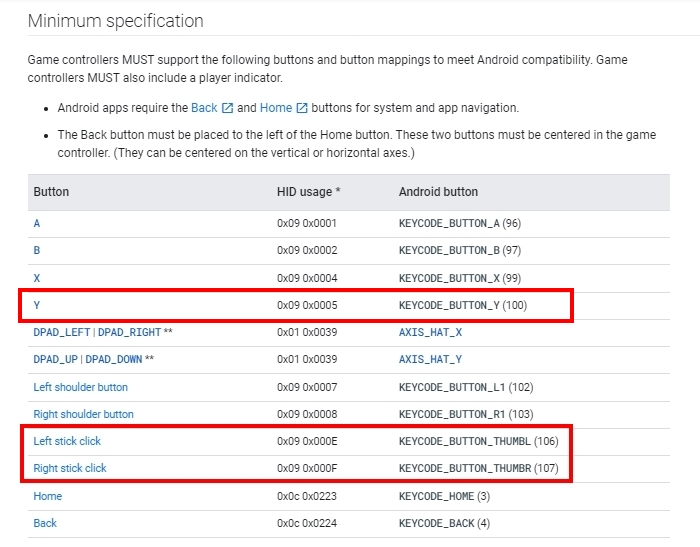
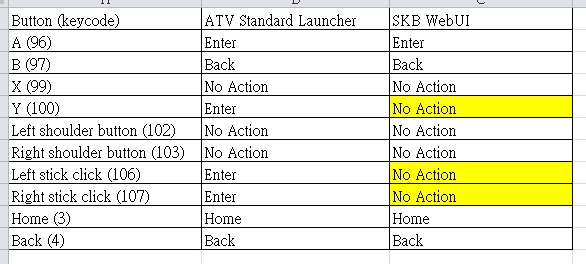
Hi YK, the Gamepad.jpg is from ATV Help Center that describe the each keys on game controller. I have compared the behavior between ATV Standard Launcher and SKB WebUI. Please check the following table (Comparsion.jpg) the keycode 106, 107, 100 should be handled by WebUI owner, the behavior of these keys are "Enter Key" on ATV Launcher. But these keys are no action on WebUI. Gamepad.jpg (173,397 bytes) Comparsion.jpg (92,550 bytes) |
|
|
Hi YK, Wooshin, I have confirmed that the gamepad key 100,106, 107 issue on WebUI is resolved on 15.530.4 (Smart 3). Please ask UI vendor to merge this fix on Swan project. |
|
|
Hi Jason Thank you for confirming it. And I sent what you said to the UI company(Digicaps). Digicaps will probably apply it to AI2MAX soon. Thank you YK.Jung |
|
|
Hi all, I have verified Swan 19.531.10. The issue has been solved, so I close this issue. |
|
|
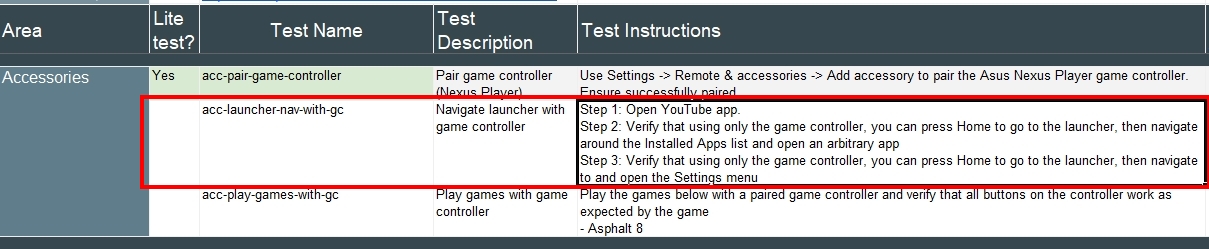
Hi YK, Wooshin, I reopen this issue, because Google add new test item in the SmokeTest (version: 2021.Q3.4) Step 1: Open YouTube app. Step 2: Verify that using only the game controller, you can press Home to go to the launcher, then navigate around the Installed Apps list and open an arbitrary app Step 3: Verify that using only the game controller, you can press Home to go to the launcher, then navigate to and open the Settings menu This item are not required in MR test currently. But this item may be enforced in the future. The key point is "arbitrary app", As far as I know, some SKB's apps do not supported Game Controller. e.g. (SKB keyboard, ZemKids, etc.) so Please ask this app's vendor to fix it. |
|
2021-08-23 10:08 developer |
Smoke2021.Q3.4.jpg (189,120 bytes) |
|
|
Hi Jason I have mentioned this issue on the skb and digicap ( UI vendor ) https://jira.skbroadband.com/browse/BFXBTF-272 I will let you know if there is any update. Thank you YK.Jung |
|
|
Hi YK, As you can see the "Test Instructions" At the end of the Step 2, there is a sentence "open an arbitrary app", and at the begin of the Step 3, there is a sentence "Verify that using only the game controller" so I think all prebuilt SKB APP should support Game controller. |
|
|
Hi all, Because Synaptics doesn't have plan to do OS upgrade on this AI2MAX. so I will close this ticket and create new one on Smart3 project. |
- yk.jung ( (ALTech) Younkwang Jung ) developer